Authentication
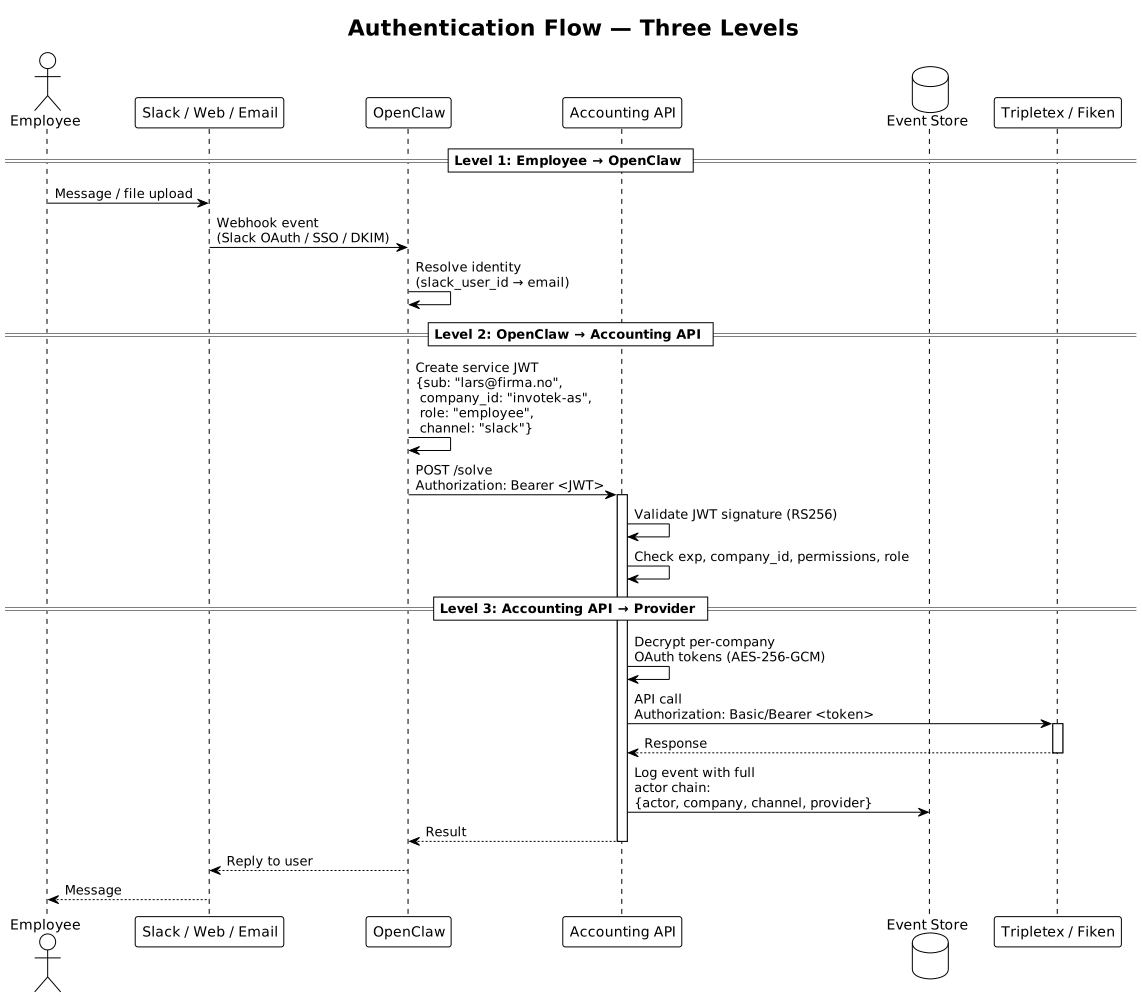
The AI Accountant uses a three-level authentication model. Each level has a different trust boundary, token type, and lifecycle.
Level 1                    Level 2                    Level 3
Employee → OpenClaw        OpenClaw → Accounting API  Accounting API → Tripletex/Fiken
(Slack OAuth, SSO,         (Service JWT, signed       (OAuth2 per-company,
 API key)                   by OpenClaw)               encrypted tokens)
Level 1: Employee to OpenClaw
The employee authenticates to OpenClaw via the channel they are using.
| Channel | Auth Method | Details |
|---|---|---|
| Slack | Slack OAuth | Bot installed in workspace, user identity from Slack event payload |
| Discord | Discord OAuth | Bot in server, user identity from Discord event |
| Teams | Microsoft SSO | Bot Framework, Azure AD identity |
| Web chat | Company SSO or API key | OAuth2 (Google/Microsoft), or API key for programmatic access |
| DKIM + sender domain | Verified sender matched to company email domain |
OpenClaw resolves the external identity (Slack user ID, email, etc.) to an internal user via the employee_mapping table (accessed through the Accounting API's GET /conversation/facts endpoint).
Level 2: OpenClaw to Accounting API
OpenClaw authenticates to the Accounting API using a service-to-service JWT signed by OpenClaw.
JWT Claims
{
  "iss": "openclaw",
  "sub": "lars@firma.no",
  "company_id": "invotek-as",
  "channel": "slack",
  "permissions": ["solve", "query", "monitor", "facts"],
  "role": "employee",
  "iat": 1711108200,
  "exp": 1711111800
}
| Claim | Description |
|---|---|
iss |
Always openclaw — identifies the issuing service |
sub |
The employee's email (resolved from channel identity) |
company_id |
Which company this request is for |
channel |
Which channel the request originated from (slack, discord, web, email) |
permissions |
What API endpoints this token can access |
role |
The employee's role: employee, manager, accountant, admin |
iat / exp |
Issued-at and expiry (1 hour TTL) |
Token Validation
The Accounting API validates every incoming request:
- Verify JWT signature (RS256, OpenClaw's public key)
- Check
exp— reject expired tokens - Check
company_id— must match a known company - Check
permissions— endpoint must be in the allowed list - Check
role— must have sufficient role for the operation (e.g.,accountantfor month-end) - Log the
sub(actor email) in every event for audit trail
Key Management
- OpenClaw signs JWTs with an RS256 private key stored in GCP Secret Manager
- The Accounting API validates with the corresponding public key
- Key rotation: new key pair generated quarterly, old key accepted for 24 hours after rotation
Level 3: Accounting API to Tripletex/Fiken
The Accounting API authenticates to accounting providers using per-company OAuth2 tokens.
Tripletex
| Token | Purpose | Lifecycle |
|---|---|---|
| Consumer token | Identifies our application | Long-lived, set during app registration |
| Employee token | Identifies the authorized company | Long-lived, obtained during onboarding OAuth flow |
| Session token | Used for actual API calls | 1-hour TTL, auto-created from consumer + employee tokens |
Session token request:
PUT /token/session/:create
Authorization: Basic base64(consumerToken:employeeToken)

API request:
Authorization: Basic base64("0":sessionToken)
Fiken
| Token | Purpose | Lifecycle |
|---|---|---|
| Access token | Used for API calls | Short-lived (1 hour), auto-refreshed |
| Refresh token | Obtains new access tokens | Long-lived, obtained during onboarding OAuth flow |
API request:
Authorization: Bearer <access_token>
Token Storage
All provider tokens are encrypted at rest:
- Each company has a unique DEK (data encryption key)
- DEK encrypts the OAuth tokens using AES-256-GCM
- DEK is wrapped with a KEK (key encryption key) in GCP Secret Manager
- Encrypted tokens stored as BYTEA in PostgreSQL
- Decrypted in-memory only when making API calls
- Never logged, never returned in API responses
Company Onboarding
When a company connects their accounting system:
1. Admin clicks "Connect Tripletex" (or "Connect Fiken") on the dashboard
2. Redirect to provider's OAuth consent screen
3. Admin authorizes access
4. Provider redirects back with authorization code
5. Accounting API exchanges code for tokens
6. Tokens encrypted with company-specific DEK
7. Stored in company table
8. Company context pre-fetched (accounts, departments, VAT types)
9. Employee mapping configured (Slack users → Tripletex employees)
Role-Based Access
Roles are assigned per employee in the employee_mapping table and carried through all three auth levels via the JWT.
| Role | Level 1 | Level 2 (JWT) | Level 3 (Provider) |
|---|---|---|---|
employee |
Can chat, submit expenses, ask questions | permissions: [solve, query, facts] |
Read + limited write |
accountant |
Full accounting operations | permissions: [solve, query, monitor, facts, rules] |
Full read/write |
admin |
Everything + configuration | permissions: [solve, query, monitor, facts, rules, config] |
Full read/write |
Audit Trail: Actor Identity Through All 3 Levels
Every event in the event store captures the full identity chain:
{
  "actor": "lars@firma.no",
  "company": "invotek-as",
  "channel": "slack",
  "provider": "tripletex",
  "api_calls": [
    {"method": "POST", "path": "/invoice", "status": 201}
  ]
}
This means: Lars (authenticated via Slack at Level 1) triggered a task through OpenClaw (authenticated via JWT at Level 2) that created an invoice in Tripletex (authenticated via session token at Level 3). The full chain is captured in a single immutable event.
Auth Flow Diagram